Power Conditioner vs Surge Protector: What Each Protects in Your Studio
Power Conditioner vs Surge Protector: What Each Protects in Your Studio
You use a surge protector to clamp voltage spikes, usually with MOVs, protecting gear from transient overvoltage. You use a power conditioner to filter conducted AC-line interference that can contribute to hum, buzz, or high-frequency noise.
Many conditioners include surge suppression, but neither device adds circuit capacity, guarantees noise removal, nor provides battery backup. Match current rating, outlet layout, grounding, and UL 1449 protection to your equipment.
Next, compare setups for computers, synths, and amplifiers.
Noise Filtering vs Surge Clamping
Power conditioners and surge protectors solve different power-quality problems. A conditioner filters electrical noise from your studio equipment and interference from devices sharing the circuit, helping reduce audible hum and recording noise. A surge protector instead clamps or redirects excess voltage during brief overvoltage events away from connected gear.
| Function | What you notice | Best fit |
|---|---|---|
| Noise filtering | Hum, buzz, or recording noise | Conditioner |
| Surge clamping | Sudden voltage spike | Surge protector |
| Both functions | Cleaner power and spike defense | Conditioner |
| Basic strip | Spike protection, usually no filtering | Surge protector |
Choose a conditioner when interference affects monitors, preamps, or recording chains. Choose a surge protector when you need spike protection. Many conditioners include both functions, but verify the model’s specifications; protection capability varies, especially versus inexpensive strips.
MOVs and Filter Circuits
Most surge protectors rely on metal-oxide varistors (MOVs) that divert excess voltage away from your studio gear during a spike. When line voltage rises beyond their threshold, MOVs conduct and absorb surge energy, limiting what reaches connected equipment. That protection isn’t permanent: repeated events or one severe surge can degrade or disable the MOVs, sometimes without an obvious external sign.
A basic surge strip uses those components for transient clamping, not for voltage stabilization or electrical-noise filtering. A power conditioner can pair surge suppression with filter circuits that attenuate radio-frequency and electromagnetic interference on the AC line. If multiple devices share a circuit, these filters can reduce conducted interference that contributes to hum and noise. Results depend on your equipment, wiring, and interference source.
Audible Noise Floor Improvement
Beyond surge clamping, a conditioner’s filter network can lower the audible noise floor when RF or electromagnetic interference reaches your audio gear through the AC line. By attenuating conducted high-frequency noise, it can prevent one device’s power supply from injecting interference into other equipment sharing the circuit. You may also hear less 50 to 60 Hz hum in monitors and capture less background contamination in recordings.
A surge protector primarily responds to voltage spikes; it doesn’t necessarily filter line noise, so it usually won’t improve your noise floor. Results depend on the source and the conditioner’s filtering design. Ground loops, poorly shielded cables, dimmers, and faulty gear can still create noise, so diagnose those paths before expecting a quieter recording from the conditioner alone in every session.
Plug-In vs. Rack Setup
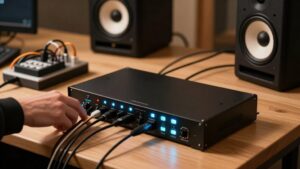
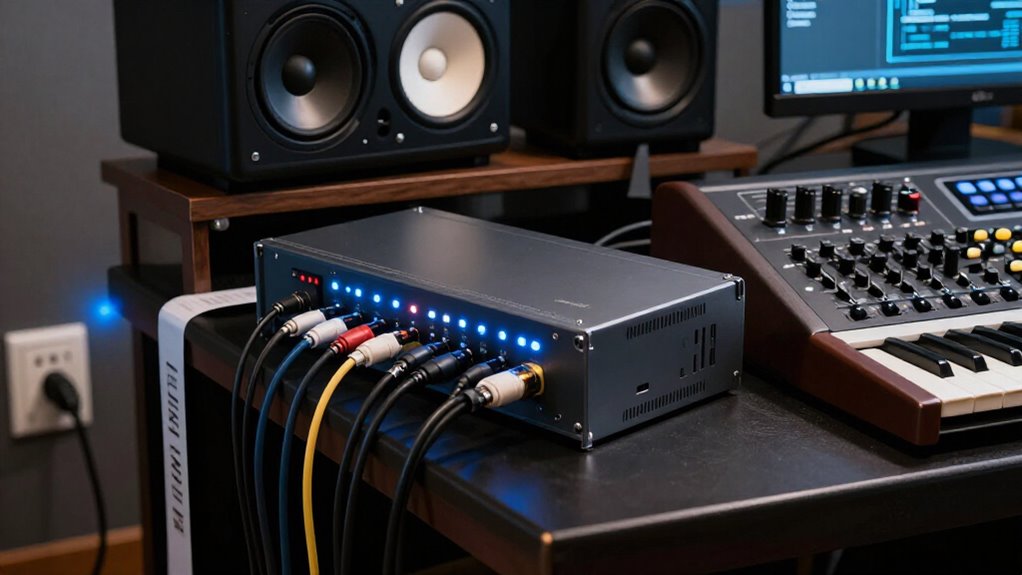
For a small home-studio setup, a plug-in surge protector offers a convenient way to protect a few devices from voltage spikes without adding rack hardware. It suits an interface, monitors, and computer accessories needing basic spike protection. If you operate several rack-mounted processors, preamps, and converters, a rackmount power conditioner centralizes their power connections inside the rack.
Its filtered outlets can limit electrical noise generated by individual devices and reduce interference among equipment sharing a circuit. Before you install one, confirm that its outlet count matches your gear, its chassis fits your available rack space, and its surge-protection rating reflects the replacement value of connected equipment. Choose plug-in protection for simplicity; choose a rackmount when centralized distribution and device-level noise filtering suit your studio.
High-Draw Amplifier Compatibility
High-draw amplifiers demand more than basic surge protection: you need a power conditioner whose continuous current rating meets or exceeds the amplifier’s specified maximum draw. Compare the conditioner’s continuous current rating with the amplifier’s published maximum draw, not merely its average consumption. On a typical U.S. 120-volt, 15-amp circuit, the theoretical ceiling is 1,800 watts, but other connected loads reduce available capacity.
High-demand amplifiers can also draw substantial startup current. If you undersize the conditioner, it may trip, overheat, or limit performance. Choose outlets and internal wiring rated for the amplifier’s current, plug it directly into a properly grounded circuit with adequate capacity, and never daisy-chain it through another power strip. A surge protector blocks spikes; it can’t add circuit capacity or prevent circuit overloads.
MOV Replacement Intervals
MOV-based surge protection doesn’t last indefinitely: each surge can degrade the varistors’ energy-handling capacity, sometimes without any visible sign of failure. You can’t assign every studio protector the same replacement interval. Follow its manufacturer’s stated service life and replacement guidance, because actual MOV life depends on the model and its surge exposure.
Replace the unit after a major event, including a nearby lightning strike, or immediately when its protection-status indicator reports failed protection. Some manufacturers specify roughly three to five years, but that’s a planning benchmark, not a guarantee. If your conditioner or protector lacks a status indicator or clear replacement guidance, don’t gamble on unknown history. Replace it when its age or surge exposure is uncertain, especially before trusting it with studio gear.
Nuisance Tripping Under Load
A surge protector can shut off under load when your connected equipment exceeds its overload rating, even if no surge has occurred. This can look like a fault, but it often reflects the combined demand of studio equipment sharing one circuit. Amplifiers, powered monitors, computers, interfaces, and lighting can push a protector or branch circuit beyond its limits.
A power conditioner may use more robust components than a basic strip, yet it doesn’t add circuit capacity. Most conditioners also don’t regulate voltage, so they won’t stop trips caused by overload or inadequate supply. Before adding gear, check the protector’s load rating and total connected draw. Include startup current and distribute loads across properly rated circuits; a conditioner can’t solve a capacity shortfall by itself.
Outlet Spacing for Power Bricks
Before you buy, check outlet spacing because oversized power bricks can block adjacent sockets. Choose a power conditioner or surge protector with widely spaced, angled, or grouped outlets so you can use more of its capacity. Count both bricks and standard plugs, and use a short properly rated extension cord if an adapter still obstructs access.
Accommodating Large Power Bricks
Large power bricks can make a conditioner or surge protector’s advertised outlet count misleading by blocking adjacent receptacles. Before you buy, compare each adapter’s width, length, and plug orientation with the unit’s outlet diagram and published dimensions. This step matters especially with rack-mounted studio models, where rear-panel receptacles may sit close together and clearance can’t be improvised easily.
Choose a model with widely spaced receptacles or outlets positioned at different angles, so bulky wall-wart supplies fit without forcing awkward installation. If your existing unit lacks sufficient clearance, use a short, properly rated extension cord to relocate the adapter. Verify its voltage, current, grounding, and connector ratings match the load and installation. Finally, count usable outlets with every brick installed, not merely the number printed.
Preserving Adjacent Outlet Access
Outlet spacing directly determines how many devices you can actually connect once bulky power bricks enter the layout. Before buying a surge protector or power conditioner, inspect the outlet spacing, layout, and orientation. Widely spaced receptacles let you use large adapters without sacrificing neighboring connections.
Rackmount conditioners may preserve access through front-panel outlets or alternating outlet orientations. If one brick still blocks an adjacent receptacle, use a short, properly rated extension cord to relocate that adapter safely. Match the cord’s current rating to the connected load and keep it as short as practical. Don’t daisy-chain power strips or conditioners to create extra outlets; that arrangement can overload the circuit or introduce a safety hazard and may violate manufacturer guidance or electrical installation requirements.
Desktop Computers vs. Synthesizers
For a desktop computer, prioritize a UPS so you can save work and shut down safely during an outage; a surge protector only handles spikes. For synthesizers, prioritize clean power, since electrical noise can become audible hum or interference that a conditioner may filter. Verify that any conditioner includes appropriate surge protection and voltage regulation if your equipment requires it, because many models don’t regulate voltage.
Computer Power Supply Behavior
Desktop computers and synthesizers handle incoming power differently, so you should match the protection device to the equipment’s actual needs. A desktop computer’s switching power supply converts AC mains power into regulated DC rails internally. That design lets many computers accept a broad input-voltage range, but it doesn’t create backup power or guarantee immunity from every electrical disturbance.
For a desktop, use a quality surge protector to limit damaging transient voltage spikes at the outlet. Verify its surge rating, grounding, and outlet capacity for your computer and display. If power fails, neither a surge protector nor a conditioner keeps the system running; you’ll need a UPS.
Synthesizers can use external adapters or internal supplies, so check each unit’s label or manual before connecting it.
Synthesizer Noise Sensitivity
Unlike most desktop computers, synthesizers can reveal electrical interference as audible hum, buzz, or high-frequency noise in their audio output. Switching supplies, graphics hardware, and USB devices in a desktop can inject noise onto a shared circuit, where sensitive synth power supplies or audio paths may make it audible. A surge protector limits transient voltage spikes, but it won’t filter that interference.
A power conditioner with noise-filtering circuitry may reduce computer-related contamination, although results vary with the synth, wiring, grounding, and circuit load. If you hear noise, run the desktop and synthesizers from separate circuits, when available, then compare recordings and monitor outputs for changes in hum, buzz, or whine. Test with the same gain settings and audio connections to isolate the power-source variable.
Protection Priorities Compared
Protection priorities differ because a desktop computer must stay running long enough to avoid data loss during an outage, while a synthesizer often needs cleaner power to prevent audible interference.
For your computer, choose a UPS when sessions, recordings, or project files can’t risk abrupt shutdowns. Its battery backup and surge protection give you time to save work and shut down properly. If you only need spike protection, a surge protector costs less, but it won’t stabilize voltage or filter electrical noise.
For synthesizers, a power conditioner’s filtering can reduce 50–60 Hz hum and other interference, while its surge protection may exceed that of a cheap strip. Don’t assume either device regulates voltage: most conditioners don’t, so use a voltage regulator when your supply varies.
UL 1449 Rating Matters
UL 1449 listing gives you a meaningful safety baseline when comparing surge protectors or power conditioners for studio gear. It confirms testing to defined surge-protection and electrical-safety requirements, but it can’t promise immunity from every surge. Check labels and manufacturer documentation before you connect valuable equipment.
- Verify the product carries a UL 1449 listing.
- Compare clamping voltage; lower listed values generally limit transient voltage more tightly.
- Review surge-current rating to gauge the device’s specified handling capacity.
- Don’t mistake the mark for noise filtering or voltage regulation; UL 1449 doesn’t evaluate those functions.
A listed conditioner may add filtration, while a listed surge strip may not. Choose models based on your studio’s protection, power-quality, capacity, and budget needs for each component in your signal chain.
Conclusion
Choose a surge protector when you primarily need transient-voltage protection, and choose a power conditioner when you also need filtered distribution, front-panel control, or rack integration. You shouldn’t expect either device to cure ground loops, poor wiring, or noise generated inside your gear.
Verify UL 1449 surge protection, joule rating, clamping voltage, and outlet layout. Keep high-draw amplifiers on appropriately rated circuits, and reserve conditioned outlets for computers, interfaces, synths, and other sensitive studio equipment.