How Often Should You Replace Headphone Ear Pads? Signs It’s Time
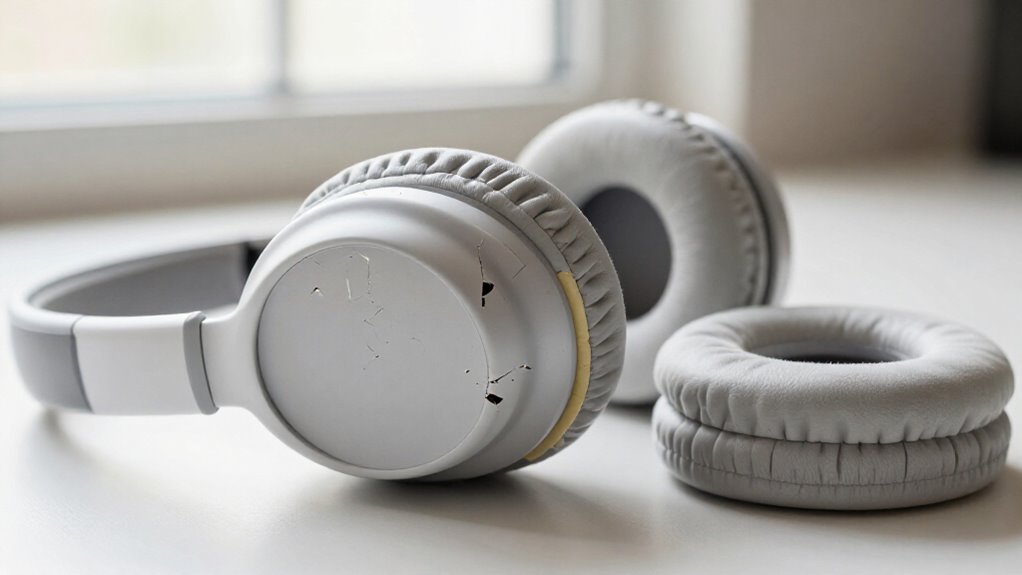
You should replace headphone ear pads about every 6–18 months, using six months or 350 listening hours as a practical baseline for daily use.
Replace them sooner if they stay flattened, rebound slowly, feel hard, crack, peel, smell after cleaning, cause discomfort, or weaken bass and noise isolation.
Wipe sweaty pads with dry microfiber, air-dry them, and compare cushion thickness monthly. Stop using headphones with ear discharge.
The details below help you set an interval.
Replacement Timing for Regular Listeners
For daily listening, plan to replace headphone ear pads about once a year, although actual service life commonly ranges from 6 to 18 months. If you listen eight or more hours daily, commute, game, or exercise, inspect the pads more frequently; prolonged compression and sweat exposure accelerate wear.
With lighter indoor use, roughly one to two hours per day, service life can extend, so don’t follow a calendar alone; let condition guide replacement. Replace pads when their cushioning remains flattened, feels hard or thin, or fails to rebound after a gentle press. Also act when you notice a weaker seal, reduced comfort, persistent odor, surface cracking or peeling, or diminished bass and noise isolation. These changes indicate the pad material no longer supports reliable acoustic coupling.
Confirm Headphone Model Compatibility
Before you order replacement ear pads, match them to your headphone’s exact brand and model, since visually similar pads can use different mounting rings, attachment tabs, or sealing profiles. Verify these details:
- Compare the product listing with your headset’s full model number.
- Measure outer dimensions, inner opening, and cushion shape.
- Confirm that any required plastic adapter is included or explicitly compatible.
- Use model-specific installation instructions or a reliable video guide.
- Remove the existing adapter gently, preserving it for reuse.
CentralSound provides model-specific replacement-pad help for Sony, Bose, and Corsair headphones. Check its compatibility guidance before purchasing, then inspect the attachment path during installation. A correct fit maintains intended clamping alignment and noise isolation. Don’t force a pad that resists seating or twists in place.
Every Six Months
A six-month replacement interval works well for daily-use headphones, particularly when heat, sweat, and long listening sessions compress or degrade the cushions. Use it as a baseline, not a fixed service limit: Bose specifies replacement at six months or 350 hours, whichever arrives first. Your flight-heavy schedule may reach that hour threshold early; occasional listening may not. Replace sooner when cushioning loses thickness, the surface flakes or cracks, odors persist, or the seal becomes uncomfortable. Confirm your manufacturer’s interval, since foam density, covering material, and clamping force affect lifespan.
| Usage pattern | Threshold | Your action |
|---|---|---|
| Daily, warm sessions | Six months | Schedule replacement |
| Frequent flying | 350 hours | Replace first |
| Occasional listening | Condition-based | Continue if comfortable |
| Flattening or cracks | Immediate | Replace pads |
Comfort and seal determine timing.
Wipe, Air-Dry, Inspect Cushions
After long listening sessions, wipe the ear pads with a dry microfiber cloth, or use a lightly damp cloth when needed; don’t soak them or use alcohol wipes. Let the cushions air-dry fully without squeezing, then check whether the foam rebounds promptly and evenly. Inspect seams and covers for cracks, peeling, or looseness, and replace pads with persistent odours, stickiness, or a weakened seal.
Use A Soft Cloth
A soft, dry microfiber cloth removes sweat, skin oils, and dust from ear pads after long listening sessions without stressing the surface material. Wipe each cushion with light, even strokes, following seams and folds where residue collects. Don’t scrub textured protein-leather or fabric covers, since friction can abrade coatings and drive grime into the material.
For stubborn dirt, dampen one corner of the cloth lightly and clean the affected area gently. Don’t soak the cushions or use alcohol wipes; excess moisture and solvents can accelerate cracking and peeling. While wiping, inspect the pads for flaking, stickiness, odour, loose attachment, or reduced thickness. Press the foam once, gently: if it stays compressed, feels hard, or rebounds slowly, the cushioning has reached the end of service life.
Air-Dry Completely
Let the ear pads air-dry fully before you wear or store the headphones, especially if you used a damp cloth. Place the headphones in a clean, ventilated area and keep the cushions exposed until no moisture remains at the seams or surface. Don’t squeeze foam pads to force out water; compression can accelerate material breakdown. For leather or protein-leather pads, wipe only with a damp, not soaking-wet, cloth, avoid soaps and detergents, and allow full drying away from direct heat.
Once dry, inspect each cushion closely. Look for cracks, peeling, flaking, loose mounting edges, stains, mildew, or damage along leather creases and stretched sections. If a pad stays rough, dry, odorous, or misshapen after drying, cleaning hasn’t restored it. Then replace both pads promptly.
Check Foam Recovery
Check foam recovery only once the cushions are fully dry. After each listening session, wipe the foam pads to remove sweat and surface dirt, then allow them to air-dry naturally. About weekly, use a damp washcloth with a small dab of soap for deeper cleaning; don’t soak the pads or squeeze wet foam, because compression can accelerate material breakdown.
When dry, press each cushion gently with your thumb and release it. Healthy foam should return to its original shape promptly and evenly. Compare both sides, since uneven recovery can affect fit and pressure distribution. If an indentation remains, the pad feels unusually hard, or rebound is slow, the foam has likely lost resilience. Reduced resilience means less cushioning, so you should replace ear pads.
Inspect Seams And Covers
After long listening sessions, wipe the ear pads gently with a dry microfiber cloth to remove sweat and skin oils before they reach the seams and cover material. For deeper cleaning, use a cloth lightly dampened with water, then lift residue without saturating the cushion. Avoid alcohol wipes and cleaners; they can strip coating plasticizers and accelerate cracking or peeling.
Set the headphones in a ventilated area and allow pads to air-dry fully before wearing or storing them. Don’t squeeze, twist, or compress foam, since mechanical stress weakens its cell structure. Under light, inspect stitching, perimeter edges, and cover surfaces. Look for loose seams, threads, cracks, flakes, peeling, sticky patches, or darkened zones. Replace pads when cover damage exposes foam or compromises the seal.
Watch For Odors
Persistent odors in ear pads usually indicate retained sweat, skin oils, or dirt rather than a temporary surface issue. Wipe the cushions after long listening sessions to remove residue before it penetrates further. For deeper cleaning, use a lightly damp cloth; avoid soaking the pads or applying alcohol wipes, which can damage coverings and foam.
Let them air-dry completely before you wear or store the headphones. Don’t squeeze the foam, because compression can accelerate its breakdown. If odor returns soon after cleaning, or the surface stays sticky, inspect for embedded grime, cracks, peeling, and flattened foam. Replace the cushions if smells or skin irritation persist: cleaning can’t restore degraded foam or damaged material and may leave the seal uneven around your ears during daily use.
Shorten Interval After Heavy Sweating
Heavy sweating accelerates foam, adhesive, and leatherette degradation, so you should inspect workout headphones more often than annually. Clean the pads gently after each sweaty session and let them dry fully, but replace them if odors return quickly or the cushioning stays flattened. Shorten the interval further if you notice stiffness, cracking, peeling, irritation, or a weakened acoustic seal.
Sweat Breaks Down Materials
Sweat accelerates ear-pad degradation because moisture, salts, and skin oils weaken foam, adhesives, and leatherette or PU coverings. During workouts or use in hot conditions, perspiration penetrates seams and surface coatings, then compresses foam and compromises the bond between layers. As the covering loses flexibility, it can become sticky, crack, peel, or expose underlying foam. Salt residue also attracts moisture, prolonging contact after you remove the headphones.
If you sweat heavily, don’t follow the replacement schedule suited to light indoor listening; your pads may wear out nearly twice as fast. After each sweaty session, gently blot and wipe the pads with a clean, dry microfiber cloth. Let them air-dry fully before storage. Replace them when cushioning stays flattened, surfaces noticeably deteriorate, or comfort declines.
Watch for Odors
Odors that persist after cleaning often signal that sweat, skin oils, and moisture have penetrated the pad material rather than remaining on the surface. When you sweat heavily, moisture drives contaminants into foam and along seams, where a surface wipe can’t reach. If the smell returns soon after cleaning, the pads have likely retained buildup below the cover, and you should shorten their replacement interval.
Heavy perspiration can weaken foam, adhesives, and leatherette, reducing service life by nearly half versus light indoor use. After workouts or extended sessions, wipe the pads gently with a dry microfiber cloth and allow complete air-drying. Lingering odor paired with itching, redness, or a sticky surface indicates that replacement is the more reliable option for comfort and material integrity.
Clean and Replace Sooner
After workouts or other high-perspiration sessions, wipe the ear pads with a dry microfiber cloth before sweat and skin oils can migrate into the cover and foam. Clean them gently with a lightly damp cloth when residue remains, then let them air-dry completely. Don’t soak the pads or squeeze their foam; either action can damage the cell structure and accelerate deterioration.
Frequent gym use changes your replacement schedule. Sweat and oils degrade foam, adhesives, and leatherette, potentially reducing pad life by nearly half versus light indoor use. Although annual replacement suits many daily users, inspect heavily used pads sooner. Replace them when odor persists after cleaning, surfaces feel sticky, leatherette cracks or peels, foam stays flattened, or discomfort and an unreliable acoustic seal continue.
No Lingering Odour
A persistent unpleasant smell often means your ear pads have absorbed sweat, skin oils, and moisture beyond what surface cleaning can remove. If odour returns soon after you clean them, oils and moisture have likely penetrated the pad covering or foam, where wiping cannot reach. Clean washable or wipeable pads according to their material instructions. Use a lightly damp, lint-free cloth, and don’t apply soap to leather pads, since it can damage the finish.
Then let the pads air-dry completely before you wear the headphones again; enclosed moisture can intensify odour and degrade materials. Replace the pads when the smell persists despite correct cleaning, particularly if you also notice stickiness, itching, redness, or visible surface wear. Fresh pads restore a cleaner contact surface effectively.
Ear Discharge: Stop Listening
Ear discharge requires a different response from ordinary ear-pad odour or wear: stop using the headphones immediately. Discharge can indicate canal irritation or an infection, not a routine ear-pad replacement issue. Remove the headphones and don’t insert cotton swabs, fingers, or any other objects into your ear. Seek advice from a healthcare professional, particularly if you also have pain, redness, itching, swelling, reduced hearing, or persistent fluid.
You may clean or replace pads that are dirty, odorous, or damaged, but replacement doesn’t diagnose or treat ear symptoms. Keep the headphones off until the ear has recovered and wearing them feels comfortable. This reduces further friction, pressure, moisture retention, and possible contamination around the outer ear. Follow the clinician’s instructions before restarting regular listening sessions.
Avoid Alcohol-Based Cleaning Wipes
Avoid alcohol-based cleaning wipes on headphone ear pads because repeated exposure can dry synthetic coverings and accelerate cracking or peeling. Alcohol can also alter the finish, making it less resilient under normal skin oils, heat, and pressure. Use only minimal moisture to prevent liquid from migrating into cushioning layers.
- After extended sessions, wipe the pads lightly with a dry microfiber cloth.
- For deeper cleaning, use a soft cloth dampened with water, not saturated.
- Keep moisture away from seams, foam, and driver openings.
- Let the pads air-dry completely before wearing the headphones again.
- If surfaces crack, peel, or remain sticky after cleaning, replace the pads; cleaning won’t restore degraded material.
Compare Cushion Thickness Monthly
Compare both ear pads side by side each month to detect gradual foam compression before it affects comfort or seal. Remove the headphones and inspect each cushion closely. Look for a lower rim, flattened center, wrinkling, or a shape that no longer matches the pad.
Press each pad with your thumb, release it. Healthy foam should recover promptly; foam that remains indented or rebounds slowly has lost resilience. Measure concern by fit as well: if one pad sits thinner, your headset can clamp unevenly and leak sound.
Notice whether your ears begin contacting the driver housing or baffle, which indicates bottoming out. Record changes or take a photo for comparison next month. Replacing compressed pads early restores comfort and a reliable acoustic seal.
Conclusion
Replace your headphone ear pads about every six months if you listen regularly, and sooner when sweat, heat, or daily use accelerates wear. Confirm replacement pads match your exact model and mounting system.
After each use, wipe cushions with a damp, non-alcohol cloth, air-dry them, and inspect seams, foam, thickness, odor, and residue. Stop listening if you notice ear discharge. Compare pad thickness monthly; replace pads that stay compressed, smell, crack, peel, or fit loosely.