12 Best Audio Interfaces for iPad in 2026
Your best iPad audio interface depends on whether you’re recording guitar, vocals, stereo gear, or livestreams.
Top 2026 choices include iRig HD 2, KYXAIN, iRig Stream, Ueteto, Saramonic SmartRig Di, Zoom U-24, Tascam iXZ, Yamaha Steinberg UR12, Synido Solo Silver, JOYO MOMIX PRO, Universal Audio Volt 1, and Volt 176.
Match USB-C or Lightning compatibility, power needs, inputs, phantom power, and direct headphone monitoring to your setup.
The options below clarify which model fits workflow.
| IK Multimedia iRig HD 2 Guitar Audio Interface | 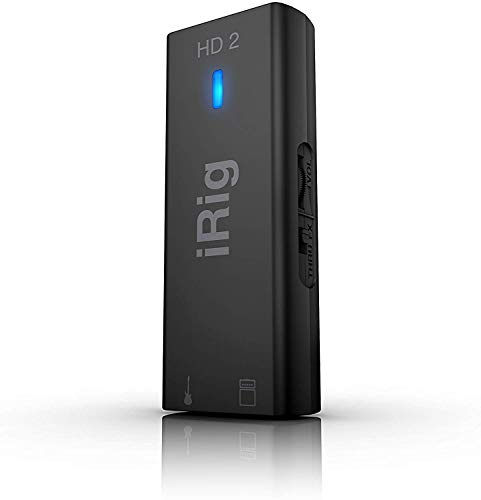 | Best for Guitarists | iPad Connectivity: Direct via included Lightning/USB-C cables | Audio Resolution: 24-bit/96 kHz | Input Types: 1/4-inch Hi-Z instrument | VIEW LATEST PRICE | Read Our Analysis |
| KYXAIN Guitar Audio Interface for Recording & Streaming |  | Budget Streaming Pick | iPad Connectivity: Lightning-to-USB-C adapter included | Audio Resolution: 24-bit/48 kHz | Input Types: 1/4-inch guitar/bass | VIEW LATEST PRICE | Read Our Analysis |
| IK Multimedia iRig Stream Stereo Audio Interface |  | Best for Streaming | iPad Connectivity: Direct via included Lightning/USB-C cables | Audio Resolution: 24-bit/48 or 96 kHz | Input Types: Stereo RCA line inputs | VIEW LATEST PRICE | Read Our Analysis |
| Ueteto Audio Interface for Guitar |  | Simplest Guitar Recording | iPad Connectivity: Lightning converter included | Audio Resolution: Not specified | Input Types: Guitar input | VIEW LATEST PRICE | Read Our Analysis |
| Saramonic SmartRig Di Lightning Audio Interface for iPhone |  | Best Mobile Mic Input | iPad Connectivity: Direct Lightning connection | Audio Resolution: Not specified | Input Types: XLR and 1/4-inch instrument | VIEW LATEST PRICE | Read Our Analysis |
| USB C Audio Interface for Recording Music Streaming Podcasting Silver |  | Best Entry-Level Studio | iPad Connectivity: USB-C connection; iPad support not specified | Audio Resolution: 24-bit/48 kHz | Input Types: XLR/6.35 mm combo input | VIEW LATEST PRICE | Read Our Analysis |
| Universal Audio Volt 1 USB Audio Interface |  | Best Overall | iPad Connectivity: USB-C iPad direct; Lightning adapter required | Audio Resolution: Up to 24-bit/192 kHz | Input Types: Single combo mic/instrument input | VIEW LATEST PRICE | Read Our Analysis |
| Universal Audio Volt 176 USB Audio Interface |  | Best for Vocalists | iPad Connectivity: USB-C iPad direct; Lightning adapter required | Audio Resolution: Not specified | Input Types: Mic/instrument input | VIEW LATEST PRICE | Read Our Analysis |
| JOYO MOMIX PRO Portable Audio Mixer Interface |  | Most Versatile Portable | iPad Connectivity: OTG smartphone ports; iPad support not specified | Audio Resolution: Not specified | Input Types: Two XLR/6.35 mm combo inputs | VIEW LATEST PRICE | Read Our Analysis |
| Zoom U-24 Portable USB Audio Interface |  | Best for Mobile Production | iPad Connectivity: Camera Connection Kit or Lightning-to-USB adapter | Audio Resolution: Up to 24-bit/96 kHz | Input Types: Two XLR/TRS combo inputs | VIEW LATEST PRICE | Read Our Analysis |
| Tascam iXZ Audio Interface for iOS Devices |  | Most Compact | iPad Connectivity: Direct iOS device connection | Audio Resolution: Not specified | Input Types: Microphone/instrument input | VIEW LATEST PRICE | Read Our Analysis |
| Yamaha Steinberg UR12 USB Audio Interface small |  | Best Budget Studio Interface | iPad Connectivity: Camera Connection Kit or Lightning-to-USB adapter | Audio Resolution: 24-bit/192 kHz | Input Types: XLR mic and TS Hi-Z inputs | VIEW LATEST PRICE | Read Our Analysis |
More Details on Our Top Picks
IK Multimedia iRig HD 2 Guitar Audio Interface
The IK Multimedia iRig HD 2 suits guitarists who want high-resolution iPad recording in a compact interface. You’ll connect its 1/4-inch Hi-Z input to your guitar and capture 24-bit/96 kHz audio on an iPad, iPhone, Mac, or PC. Adjustable input gain helps you set recording and monitoring levels, while the headphone output supplies its own preamp and level control for private practice.
Use the 1/4-inch Amp Out in FX or Thru mode to route processed or direct signals without changing levels. USB-C, Lightning, and USB cables support flexible setups. You can connect keyboards, access AmpliTube content, and mount it.
- iPad Connectivity:Direct via included Lightning/USB-C cables
- Audio Resolution:24-bit/96 kHz
- Input Types:1/4-inch Hi-Z instrument
- Headphone Monitoring:Headphone output with level control
- Phantom Power:Not specified
- Power Method:USB-powered
- Additional Feature:FX/Thru amp output switching
- Additional Feature:AmpliTube exclusive content access
- Additional Feature:Microphone stand mounting clip
KYXAIN Guitar Audio Interface for Recording & Streaming
KYXAIN’s budget streaming pick suits guitarists who want simple, portable iPad recording without extra gear. Its 24-bit/48 kHz audio captures electric guitar or bass for livestreams, while low-latency processing helps keep sound aligned with video. Plug the 1/4-inch input into your instrument, monitor through the 3.5 mm headphone jack, and use the volume buttons to set listening level.
The status light turns red when distortion risks increasing. A Type-C connection and included Lightning-to-Type-C adapter cover iPads, iPhones, Android phones, and laptops. You don’t need batteries, and the clip-on, pocket-size design travels. It only records; edit and mix audio elsewhere.
- iPad Connectivity:Lightning-to-USB-C adapter included
- Audio Resolution:24-bit/48 kHz
- Input Types:1/4-inch guitar/bass
- Headphone Monitoring:3.5 mm headphone output
- Phantom Power:Not specified
- Power Method:Plug-and-play; no batteries
- Additional Feature:Live-streaming app compatibility
- Additional Feature:Back-clip pocket design
- Additional Feature:Green/red distortion indicator
IK Multimedia iRig Stream Stereo Audio Interface
IK Multimedia’s iRig Stream suits iPad creators focused on streaming with simple, direct stereo audio capture. Use its RCA inputs to feed a mixer, keyboard, player, or studio gear into your broadcast. Included USB-C, Lightning, and USB connections expand device compatibility. You can monitor in real time through headphones, while loopback adds audio from your tablet or phone as you play along.
Plug in microphone-equipped earbuds when you need to speak or sing. The level LED helps you set gain quickly. It works with Clubhouse, Instagram, and Zoom. Its listed specifications cite 48 kHz and 96 kHz sample rates.
- iPad Connectivity:Direct via included Lightning/USB-C cables
- Audio Resolution:24-bit/48 or 96 kHz
- Input Types:Stereo RCA line inputs
- Headphone Monitoring:Direct real-time headphone monitoring
- Phantom Power:Not specified
- Power Method:USB-powered connection
- Additional Feature:Stereo RCA input connections
- Additional Feature:Built-in audio loopback
- Additional Feature:Earbud microphone support
Ueteto Audio Interface for Guitar
Ueteto offers the simplest guitar recording for beginners who want direct mobile capture without extra setup. This pocket-sized, driver-free interface lets you plug in, record guitar to your iPad, and sync sound with video. It needs no charging, and you can monitor through headphones using its 3.5 mm jack.
Ueteto includes a USB-C cable and Lightning converter, so it works with iPhones and Android phones; enable OTG on Android. Watch the indicator: green is normal, while red signals excessive input that can distort recordings. It’s recording-only, not an editing or mixing tool, and it doesn’t work with GarageBand. App support varies.
- iPad Connectivity:Lightning converter included
- Audio Resolution:Not specified
- Input Types:Guitar input
- Headphone Monitoring:3.5 mm headphone monitoring
- Phantom Power:Not specified
- Power Method:No charging required
- Additional Feature:Driver-free plug-and-play setup
- Additional Feature:Video-synced mobile recording
- Additional Feature:Green/red overload indicator
Saramonic SmartRig Di Lightning Audio Interface for iPhone
For creators needing a go-to mobile mic input, the Saramonic SmartRig Di brings XLR recording to iPads and iPhones. You can connect a professional microphone, including a shotgun or lavalier, to improve sound in video and recording apps. Its XLR input supplies 48V phantom power, while the 1/4-inch combo input accepts instruments.
This one-channel Lightning interface also gives newer iPhones a headphone jack. Its compact, lightweight body travels easily, and the included strap secures it to a selfie stick, tripod, stand, stabilizer, or belt. A rear metal 1/4-inch-20 thread provides another mounting option. You’ll get a focused solution for mobile recording.
- iPad Connectivity:Direct Lightning connection
- Audio Resolution:Not specified
- Input Types:XLR and 1/4-inch instrument
- Headphone Monitoring:Headphone jack for newer iPhones
- Phantom Power:+48 V phantom power
- Power Method:Power method not specified
- Additional Feature:Selfie-stick mounting strap
- Additional Feature:Rear 1/4-inch tripod thread
- Additional Feature:Professional microphone connectivity
USB C Audio Interface for Recording Music Streaming Podcasting Silver
Synido’s Solo Silver gives new creators a capable entry-level studio front end for iPad recording. Its independent audio chip captures at 24-bit/48 kHz, helping you record vocals, instruments, streams, and podcasts with low latency and natural detail. You can select Stereo, Mix, or USB monitoring, then use separate controls and multicolor LEDs to manage levels before distortion occurs. The combo XLR/6.35 mm input switches between line and instrument sources, while selectable 48 V phantom power supports compatible microphones.
At 300 g, it travels. You also get headphone adapter and USB-C-to-USB-A cable, although you’ll need a compatible USB-C iPad connection.
- iPad Connectivity:USB-C connection; iPad support not specified
- Audio Resolution:24-bit/48 kHz
- Input Types:XLR/6.35 mm combo input
- Headphone Monitoring:Monitoring modes; headphone output not specified
- Phantom Power:Switchable 48 V phantom power
- Power Method:USB-powered connection
- Additional Feature:Three selectable monitoring modes
- Additional Feature:Independent control sections
- Additional Feature:Line/instrument input switching
Universal Audio Volt 1 USB Audio Interface
The Universal Audio Volt 1 stands out as an all-around iPad recording interface with genuine studio character. You can engage Vintage mode to add the rich, classic flavor of UA 610 preamps to vocals, guitars, and sources.
Its clear converters capture detailed takes at up to 24-bit/192 kHz. You’ll also get LUNA, UAD plug-ins, instruments, and tutorials that help you progress from first recordings to polished mixes. Volt 1 works with iPad, iPhone, Mac, and Windows. For Lightning iPads, you’ll need the external Volt power supply and Apple Lightning to USB Camera Adapter; USB-C iPads connect without that adapter.
- iPad Connectivity:USB-C iPad direct; Lightning adapter required
- Audio Resolution:Up to 24-bit/192 kHz
- Input Types:Single combo mic/instrument input
- Headphone Monitoring:Monitoring output not specified
- Phantom Power:Not specified
- Power Method:External power supply for mobile use
- Additional Feature:Vintage 610 preamp mode
- Additional Feature:LUNA recording software included
- Additional Feature:UAD plug-ins and instruments
Universal Audio Volt 176 USB Audio Interface
Universal Audio’s Volt 176 suits vocalists who want polished, character-rich iPad recordings. Its Vintage mode brings classic UA 610-style preamp color, helping you capture album-ready vocals or instruments without complicated processing. The built-in analog compressor, inspired by the 1176, adds punch and clarity before your tracks reach your iPad.
You can record and mix in LUNA, then refine sounds with UAD plug-ins and instruments. Tutorials support all creators. Volt 176 works with iPads and iPhones running iOS 14 or later, plus Macs and Windows PCs. USB-C iPads connect directly; Lightning models need Apple’s Camera Adapter and Volt power supply.
- iPad Connectivity:USB-C iPad direct; Lightning adapter required
- Audio Resolution:Not specified
- Input Types:Mic/instrument input
- Headphone Monitoring:Monitoring output not specified
- Phantom Power:Not specified
- Power Method:External power supply for mobile use
- Additional Feature:Analog 1176-style compressor
- Additional Feature:Vintage 610 preamp mode
- Additional Feature:LUNA DAW integration
JOYO MOMIX PRO Portable Audio Mixer Interface
For mobile creators, the MOMIX PRO is the most versatile portable mixer for two-device streams. You can connect two phones through its OTG ports, using one for your broadcast and another for backing tracks without an AUX cable. Its two combo XLR/6.35 mm inputs handle microphones, guitars, basses, or keyboards, while 48V phantom power supports condensers.
A dedicated stereo instrument input and three-channel mixing expand your options. You’ll get adjustable reverb, vocal cancel, and direct monitoring through two headphone outputs. MAIN OUT feeds speakers or a mixer. At 0.2 kg, its rechargeable battery delivers four to five hours for sessions.
- iPad Connectivity:OTG smartphone ports; iPad support not specified
- Audio Resolution:Not specified
- Input Types:Two XLR/6.35 mm combo inputs
- Headphone Monitoring:Two independent headphone outputs
- Phantom Power:48 V phantom power
- Power Method:Built-in rechargeable battery
- Additional Feature:Dual-phone streaming capability
- Additional Feature:Built-in three-level reverb
- Additional Feature:Vocal-cancel backing-track mode
Zoom U-24 Portable USB Audio Interface
Zoom’s U-24 suits mobile producers who need two inputs and iPad-ready recording on the go. You get two XLR/TRS combo inputs with high-performance mic preamps, letting you track microphones, instruments, or line-level gear. It records and plays back stereo or multichannel audio at up to 24-bit/96 kHz.
Connect it to your iPad with Apple’s Camera Connection Kit or Lightning-to-USB Camera Adapter, sold separately. For iPad sessions, you’ll need two AA batteries or the optional AC adapter. MIDI I/O and RCA outputs expand your setup, while included codes give you Pro Tools | First access and Ableton Live 9 Lite too.
- iPad Connectivity:Camera Connection Kit or Lightning-to-USB adapter
- Audio Resolution:Up to 24-bit/96 kHz
- Input Types:Two XLR/TRS combo inputs
- Headphone Monitoring:Headphone output not specified
- Phantom Power:Not specified
- Power Method:Two AA batteries or optional AC adapter
- Additional Feature:MIDI input/output connections
- Additional Feature:Multi-channel recording/playback
- Additional Feature:Included DAW software bundle
Tascam iXZ Audio Interface for iOS Devices
Tascam’s most compact iXZ suits iPad musicians who need mic or instrument recording on the go. You can connect a microphone, guitar, or bass to your iPad, iPhone, or iPod touch and work with compatible amp, sampling, recording, and DJ apps. Its input setting lets you adjust gain, while phantom power supports condenser microphones. A headphone output lets you monitor audio directly from your iOS device.
The pocket-sized white interface travels easily, and two AA batteries power microphone recording. Choose this Tascam model when you want a simple, portable way to capture ideas or practice through iOS music apps.
- iPad Connectivity:Direct iOS device connection
- Audio Resolution:Not specified
- Input Types:Microphone/instrument input
- Headphone Monitoring:Headphone output
- Phantom Power:Phantom power supported
- Power Method:Two AA batteries
- Additional Feature:Guitar amp app support
- Additional Feature:Sampling and DJ app support
- Additional Feature:Pocket-sized white design
Yamaha Steinberg UR12 USB Audio Interface small
Steinberg’s UR12 is a standout budget studio interface for iPad-owning home recordists. You’ll get 24-bit/192 kHz recording through a Class-A D-PRE mic preamp, plus +48V phantom power for condenser microphones. Its XLR input handles your vocal mic, while the TS Hi-Z input lets you track guitar or bass.
Two RCA line outputs connect monitors or a hi-fi system. The compact UR12 runs from USB power with a Mac. For iPad sessions, use its additional mini power socket with a suitable USB supply and connect through Apple’s Camera Connection Kit or Lightning-to-USB Camera Adapter. It’s compatible with Windows and OS X.
- iPad Connectivity:Camera Connection Kit or Lightning-to-USB adapter
- Audio Resolution:24-bit/192 kHz
- Input Types:XLR mic and TS Hi-Z inputs
- Headphone Monitoring:Headphone output not specified
- Phantom Power:+48 V phantom power
- Power Method:USB-powered; optional USB power for iPad
- Additional Feature:Class-A D-PRE preamp
- Additional Feature:Stereo RCA line outputs
- Additional Feature:Dedicated iPad power socket
Factors to Consider When Choosing Audio Interfaces for iPad
When choosing an audio interface for your iPad, confirm that its connection works with your model and provides the inputs you need. Compare audio resolution, latency, and power requirements to guarantee reliable recording and playback. You’ll also want monitoring and output options that fit your headphones, speakers, and workflow.
iPad Connection Compatibility
Start by matching the audio interface’s connection to your iPad’s port: USB-C models connect directly to newer iPads, while Lightning-equipped iPads may need a compatible Lightning-to-USB or camera connection adapter. Before buying, verify that the interface and any adapter support your iPad model. Some USB interfaces work only through a separate camera connection adapter, and manufacturers don’t always include it. Confirm that the interface supports your iPadOS version and the recording or music apps you’ll use.
Also check its power demands. Your iPad might not provide enough power for every interface, especially during longer sessions. If the model needs an external supply or batteries, plan for that equipment before you record. Checking these details upfront prevents connection failures and keeps your setup reliable overall.
Input Types And Count
Once you’ve confirmed iPad compatibility and power needs, choose inputs that match what you plan to record. Hi-Z instrument inputs suit electric guitars and basses, while XLR inputs accept microphones and may supply phantom power for condenser mics.
Combo XLR/¼-inch sockets can handle microphones or instruments, but check whether each one switches correctly among mic, line, and instrument levels. If you record one source at a time, one input may be enough. For vocals and an instrument recorded together, choose multiple inputs.
Stereo line inputs, often on RCA connectors, suit mixers, keyboards, and other gear with left and right outputs. Check connector types alongside input count: socket totals alone don’t reveal how many separate sources or channels you can capture simultaneously during a session.
Audio Resolution And Latency
Audio resolution affects both recording quality and storage demands. Choose an interface that records at 24-bit if you want greater dynamic range and more headroom. It lets you capture quieter details without pushing levels close to clipping.
Sample rate describes how often the interface captures audio each second. You’ll commonly see 48 kHz and 96 kHz, while some models reach 192 kHz. Higher rates create larger files and add processing demands, so make sure your iPad app and workflow can handle them during demanding sessions, too.
For tracking, low-latency monitoring keeps your performance aligned with what you hear, especially with video or backing tracks. Check for direct monitoring or a responsive monitoring path, because latency also depends on your iPad, app, and recording settings.
Power Requirements
Power Requirements
Power can shape how reliably an interface works with your iPad, particularly during longer sessions. Check whether your interface runs from the iPad’s port or requires batteries, a USB power bank, or an external supply. Your iPad must deliver enough current for the interface and every connected microphone or instrument.
Factor in the adapter, too. Depending on your iPad’s connector, a camera adapter may be necessary, and its power-pass-through design can determine which interface setups work properly. For extended recording or streaming, choose battery operation or external power so you don’t rapidly drain the iPad. If you use condenser microphones, confirm the interface supplies 48 V phantom power and that its chosen power source can support that added demand throughout long sessions without issue.
Monitoring And Output Options
Monitoring and output options determine how comfortably you can record, stream, and perform with an iPad. A dedicated headphone jack lets you hear your input in real time while you record or stream. Choose an interface with independent headphone level control, so you can set a comfortable listening volume without affecting the recording level. Direct monitoring is especially valuable when you play an instrument alongside tracks from your iPad, since it minimizes distracting delay.
Also match the interface’s physical outputs to your setup. Stereo line outputs can send sound to powered speakers, studio monitors, or a mixer, while an instrument output can feed an amplifier. If you create livestreams, lessons, or overdubs, loopback and mix-monitoring features let you hear iPad playback and your input.
Phantom Power And Preamps
If you plan to record with a condenser microphone, choose an iPad interface that provides switchable 48 V phantom power. Verify that its power arrangement can sustain phantom power while you use the iPad; some interfaces need an external power source for reliable operation.
Pay close attention to the preamp section. Gain controls let you match input levels to different microphones and instruments, while a high-quality preamp helps you capture a clear signal. Set gain carefully: excessive input level can distort recordings. If you track guitar or bass, select an interface with a dedicated high-impedance (Hi-Z) input. It handles instrument-level pickups more appropriately than a microphone input and helps preserve a cleaner, more usable tone before it reaches your recording app or session.
Portability And Build Quality
For mobile recording and streaming, a compact, lightweight interface fits more easily into your laptop or gig bag and makes setup less burdensome. Pocket-sized models let you capture ideas, podcasts, or live sessions without adding noticeable bulk.
Even small weight savings matter when you travel; some portable mixers weigh only 0.2 kg. Before buying, check how the interface receives power. Battery operation, USB charging, or an external adapter can each change how practical it is away from a desk.
Also consider how securely you can position it. A mounting clip or tripod thread helps attach the unit to a stand, belt, or recording rig. Finally, choose a sturdy enclosure with reliable cable connections. You’ll pack and reconnect it often, so durable sockets prevent disruptions.
Frequently Asked Questions
Which iPad Models Support USB-C Audio Interfaces Without Adapters?
You can connect USB-C audio interfaces to iPad Pro from 2018 onward, iPad Air from fourth generation onward, iPad mini from sixth generation onward, and standard iPads from tenth generation onward. You won’t need adapters.
Can I Charge My iPad While Using an Audio Interface?
Yes, you can charge your iPad while using an audio interface if you choose a USB-C hub or interface with Power Delivery pass-through. Connect charger to its PD port, then monitor compatibility and wattage requirements.
Do Audio Interfaces Work With Garageband for iPad?
Yes, you can use most class-compliant audio interfaces with GarageBand for iPad. You’ll connect through USB-C or Lightning, grant microphone access, select the interface as input, and record instruments or vocals with low latency reliably.
What Cables Are Required for Lightning-Equipped iPads?
You’ll need Apple’s Lightning-to-USB 3 Camera Adapter, your interface’s USB cable, and a Lightning power cable plus charger. Connect the charger to the adapter for reliable power, especially with bus-powered interfaces and microphones when needed.
How Can I Reduce Latency During iPad Recording?
Reduce latency by choosing a class-compliant interface, connecting it directly, lowering your buffer size, closing background apps, monitoring through the interface, and using wired headphones. You’ll get smoother recording when you keep your iPad updated.
Conclusion
12 Best Audio Interfaces for iPad in 2027
You’ve seen how the right iPad audio interface can turn simple recording sessions into polished music, podcasts, streams, and guitar tracks. Choose the model that matches your inputs, portability needs, budget, and preferred iPad connection. Don’t overlook sound quality, monitoring, power requirements, and app compatibility. Whether you’re tracking vocals at home or creating on the road, a dependable interface lets you capture ideas quickly, clearly, and confidently whenever inspiration strikes for your next creative project.