Do I Need a Power Conditioner for My Home Studio? Noise, Surges and Myths
You usually don’t need a power conditioner for a home studio: a quality, surge-protected strip is enough when wiring and cables are sound.
First, place interconnected gear on one outlet, reseat leads, and isolate shared loads.
A conditioner can filter conducted high-frequency noise and add surge protection, but it won’t fix ground loops, bad cables, or single-coil pickup.
Consider one only for repeatable hum, buzz, or voltage events.
Next, test circuits and choose protection wisely.
Usually No—Unless Hum Persists
For most home studios, you don’t need a power conditioner: a quality surge-protected power strip is usually sufficient, and audible noise more often traces to a grounding, cable, or connection problem than to ordinary AC line noise.
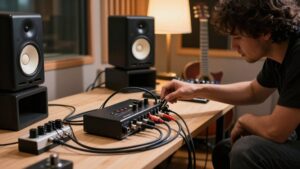
First, plug all interconnected audio equipment into the same wall outlet or strip, then test methodically. Reseat cables, separate audio leads from mains adapters, and disconnect devices one at a time. If a steady 50/60 Hz hum or buzz remains through multiple sessions after these checks, power distribution may contribute.
A conditioner becomes reasonable when the symptom persists consistently, not merely when you hear occasional noise. It won’t cure pickup interference entering a guitar’s single-coil electronics or defective cable. Skip voltage regulation; tight-tolerance units cost about $2,000.
EMI Filtering Versus Surge Protection
EMI filtering and surge protection solve different power problems: filtering attenuates high-frequency electrical noise that can couple into audio equipment, while surge protection clamps short, high-voltage spikes from lightning or switching events. A conditioner commonly combines line-noise filtering with sturdier surge components, so you can reduce some shared-circuit buzz or static while protecting gear from transient overvoltage.
Don’t treat either function as voltage regulation; regulation holds output near 120 V within a specified tolerance, but it doesn’t remove RF noise or clamp spikes. If hum remains, identify its path first. Ground loops and magnetic pickup from transformers or amp coils often require wiring, placement, or source-specific fixes, not additional filtering. Check protection ratings and replace strips after major surge exposure when their indicators fail.
Late-Night Vocal Booth Example
When you track vocals late at night, shut down nearby loads such as cycling HVAC, refrigerator compressors, charging vacuums, and phone or tablet chargers before blaming the booth.
Run a silence test with loads off, then restore them one at a time. If hum or buzz enters through shared equipment: interface, monitors, or amp, a quality conditioner adds filtering and surge protection. It won’t cure airborne EMI/RFI: if a guitar amp affects single-coil pickups, increase separation and improve booth isolation. U.S. voltage droops and spikes can cause unstable operation; regulation holds output near 120 V.
A $200 conditioner is usually enough; skip a $2,000 regulator unless tests justify it. Higher-end models can hold it within ±2 V during long sessions, keeping levels consistent too.
SMP, LiFT, and EVS Circuits
SMP surge protection helps you limit transient damage, while LiFT filtering targets conducted EMI/RFI and the hum or buzz that can raise your noise floor. EVS voltage shutdown disconnects your gear when incoming voltage moves outside safe limits.
You should verify each function’s specifications, especially joule rating, clamping behavior, and shutdown thresholds, rather than assuming one circuit covers every power problem.
SMP Surge Protection
For higher-stakes protection than a basic MOV power strip can provide, SMP, LiFT, and EVS circuit designs use dedicated surge-management topologies to limit transient energy reaching studio equipment. These designs respond to line impulses from lightning, utility events, and switching loads, directing surge energy toward earth and reducing let-through energy at connected gear.
| Check | Why it matters |
|---|---|
| Published UL/type rating | Confirms tested protection |
| Repeated-event rating | Indicates durability |
| EVS behavior | Detects abnormal voltage |
| Ground path | Supports energy diversion |
Compare published joule and UL specifications, not marketing labels. Robust SMP designs withstand repeated events, not merely one test. They won’t correct cable-grounding faults or nearby RF interference; diagnose those separately.
Use one within a grounded protection plan for valuable interfaces, monitors, and studio computers.
LiFT Noise Filtering
LiFT (Low Impedance Filtering Technology) targets the continuous high-frequency noise riding on an AC line, reducing the conductive interference that can reach sensitive studio electronics and contribute to audible hum or buzz. Rather than responding only to large transients, dedicated series-mode or multi-stage filter sections attenuate ongoing line-borne high-frequency components before they enter your power supplies and analog stages. This can lower noise when contaminated mains is the cause.
It won’t cure a ground loop, faulty cable, or radiated RF; diagnose those paths separately. Look for published attenuation data and proper safety certification, then treat any audible improvement as system-dependent. Filtering works best when you place noisy switching supplies and dimmers on separate circuits or outlets, rather than expecting a conditioner to solve everything.
EVS Voltage Shutdown
EVS voltage shutdown protects connected equipment when the AC supply sags below or rises above its allowed operating range, rather than attempting to ride through an unstable condition that can cause resets, data errors, or hardware stress.
In SMP, LiFT, or broadcast-style circuits, this protection responds to undervoltage and overvoltage events, then disconnects power if voltage remains unsafe or crosses its threshold. It doesn’t replace a surge protector: shutdown logic primarily reacts to voltage quality, especially brownouts.
A surge-only strip therefore won’t prevent a sag-triggered shutdown. Check line voltage under load, during HVAC, refrigerator, or vacuum operation. Frequent dips can indicate overloaded circuits, loose connections, or shared-load interference. Choose conditioning that stabilizes voltage within the equipment’s specified range as well as providing surge protection.
If your studio shares a circuit with a refrigerator, compressor start/stop cycles can create brief voltage dips and switching transients that raise hum or reduce headroom. Use a properly rated conditioner with surge suppression and noise filtering, but choose voltage regulation if you need output held near 120 V.
For the most reliable result, move studio gear to a dedicated circuit and troubleshoot grounding or cabling if noise persists.
Refrigerator Compressor Noise
A refrigerator compressor can kick noise onto a shared circuit as it starts and cycles, producing brief current inrush, voltage dips, and 50/60 Hz-related interference that may show up as hum or a changing noise floor in your monitors.
To confirm coupling, mute your monitors, then observe whether their buzz or noise floor changes when the compressor starts. Repeat it to verify the pattern. A basic surge strip usually won’t solve this problem: it primarily handles larger surge events, not continuous line-borne interference. A real conditioner may reduce noise through filtering, and models with isolation can help in some setups. However, don’t buy one first. Move your studio gear to another circuit, or install a dedicated outlet. Separating the loads is generally the most reliable remedy.
Voltage Dips And Spikes
When a refrigerator compressor starts or stops on the same household circuit as your studio equipment, its high inrush current can briefly sag the line voltage and create switching transients. You may hear pops, crackle, or increased hum when that transient reaches an interface, mixer, or powered monitors.
These events are brief, but sensitive gear can respond inconsistently during each compressor cycle. Confirm the pattern by recording silence or watching a conditioner’s input/output metering while the refrigerator cycles. Tight correlation points to a shared-circuit disturbance, not a signal-chain setting. A conditioner with filtering and surge protection can reduce noise; models with regulation can hold output near 120V, within about ±2V. Surge-only strips may clamp small switching events, yet their protection varies for larger transients.
Dedicated Circuit Considerations
Because a refrigerator’s compressor draws high inrush current, sharing its branch circuit with studio gear can produce brief voltage disturbances and conducted noise. Those events may stress power supplies and raise the chance of hum, buzz, or ground-loop-like behavior, particularly when your interface, computer, monitors, amplifier, and outboard equipment share one outlet run.
Test the connection before buying hardware: record and monitor at idle while the refrigerator cycles. If the noise floor changes, the shared circuit is a credible cause. A conditioner may attenuate some conducted interference, but it can’t isolate your supply from appliance startup demands.
Have a qualified electrician install a dedicated studio circuit, or separate audio/computing and appliance branch circuits. This reduces modulation and gives sensitive equipment cleaner overall supply conditions.
Rackmount Sequencing for Boot-Up
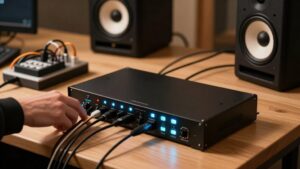
Rackmount sequencers automate a safe boot-up order, so your audio interface and digital processors stabilize before monitors or power amps receive AC power. A typical 2U unit provides individually switched outlets and adjustable delays, often one to 60 seconds, between stages. Set interfaces, converters, and other digital processors first; then bring up control surfaces and monitors; power amps last. This sequence keeps startup transients, relay clicks, and changing gain states from reaching speakers as audible thumps.
Timing also helps digital equipment complete clock locking and connection handshakes before downstream gear relies on it, reducing startup sync errors. Most sequencers add surge and overload protection, plus one master switch. Reverse the order at shutdown: amps first. That routine protects speakers during relay and standby transitions.
Space Heater Voltage Sag
A 1,500-watt space heater can impose a large load step on a household circuit, briefly pulling line voltage down as it switches on or cycles its thermostat. On the same branch circuit, that sag can coincide with hum, glitches, or unstable tube and digital gear.
A basic conditioner filters some noise and suppresses surges, but it can’t replace missing voltage. Only a regulator is designed to hold output near 120 V, and it costs more. First, test correlation: record while the heater cycles during sensitive takes. Then move your interface and monitors to another wall circuit or install a dedicated circuit.
| Condition | What you notice |
|---|---|
| Heater shares studio circuit | Noise or dropouts may track cycling |
| Separate/dedicated circuit | Sag risk falls at your gear |
Daisy-Chaining Power Strips
Daisy-chaining power strips can create a hidden overload: the downstream strip may carry more current than its cord, outlets, or internal contacts are rated to handle.
Even when the upstream strip appears lightly loaded, equipment on the second strip can exceed its own current or wattage limit. Extra cord length and connections also raise resistance, so high-draw devices can produce voltage drop and unstable operation. They can also increase the chances of 50/60 Hz hum between connected gear.
- Don’t assume two surge strips provide twice the protection; their clamping capacity doesn’t stack predictably.
- Keep active monitors, lighting heaters, and other heavy loads off chained strips.
- Use one properly rated distribution strip, conditioner, or UPS with adequate outlets and wattage headroom instead.
Check Outlet Grounding First
Before you add a conditioner, verify that the studio outlet has a correct earth ground: missing or faulty grounding commonly causes 50/60 Hz hum and buzz that filtering can’t fully remove. In the US, use a plug-in wiring tester to confirm hot, neutral, and ground connections. An open ground or reverse polarity requires an electrician-installed correction, not a conditioner.
Keep interconnected gear on one consistently grounded outlet path; mixed circuits can form ground loops. After wiring passes, assess surge protection and filtering. Don’t defeat the ground pin or use cheater adapters; they remove the safety reference and can worsen noise, shock risk, and surge protection performance.
| Test | Result | Action |
|---|---|---|
| Tester | Open ground | Repair wiring |
| Tester | Reverse polarity | Correct wiring |
| System | Multiple circuits | Consolidate path |
Conclusion
You probably don’t need a power conditioner if your studio is quiet and your outlets test correctly. Use a surge protector for protection, not as a cure for hum or voltage sag.
If noise remains, isolate the source: inspect grounding, shared refrigerator circuits, dimmers, and heater loads. Choose SMP, LiFT, EVS, filtered, or sequenced rack power only when measurements or symptoms justify it. Never daisy-chain strips. Proper wiring alone solves most home-studio power problems reliably.